Infrastructure · September 2026
ARO Landing Zone Design for Regulated Enterprises: The Architect's Guide
16 min read
Most enterprises that deploy Azure Red Hat OpenShift make the same mistake: they treat it as a Kubernetes deployment problem. They provision a cluster, configure a few operators, and call it done. Six months later they're dealing with networking failures at scale, compliance gaps that auditors found before they did, identity sprawl that no one can untangle, and cost overruns with no attribution model. The cluster is fine. The foundation underneath it was never designed for production.
ARO is a managed application platform. But “managed” only covers the control plane and worker node lifecycle. Everything underneath — the network topology, the identity model, the governance boundary, the security controls, the connectivity to your enterprise systems — that's your responsibility. And in regulated industries, getting it wrong isn't a technical inconvenience. It's a compliance finding, a failed audit, or a production incident that traces back to a design decision made on day one.
This is the guide we wish existed when we started deploying ARO in regulated enterprises. It covers the design decisions that actually matter — not the ones that are easy to document, but the ones that determine whether your ARO deployment succeeds or fails in production.
The Conceptual Architecture: ARO as Part of Your Landing Zone
Before diving into design decisions, it's important to understand where ARO sits within the broader Azure landing zone architecture. ARO is not a standalone deployment — it is an application landing zone that sits within your platform foundation. The platform foundation handles shared services: networking hub, identity, governance, and security. ARO inherits all of it.
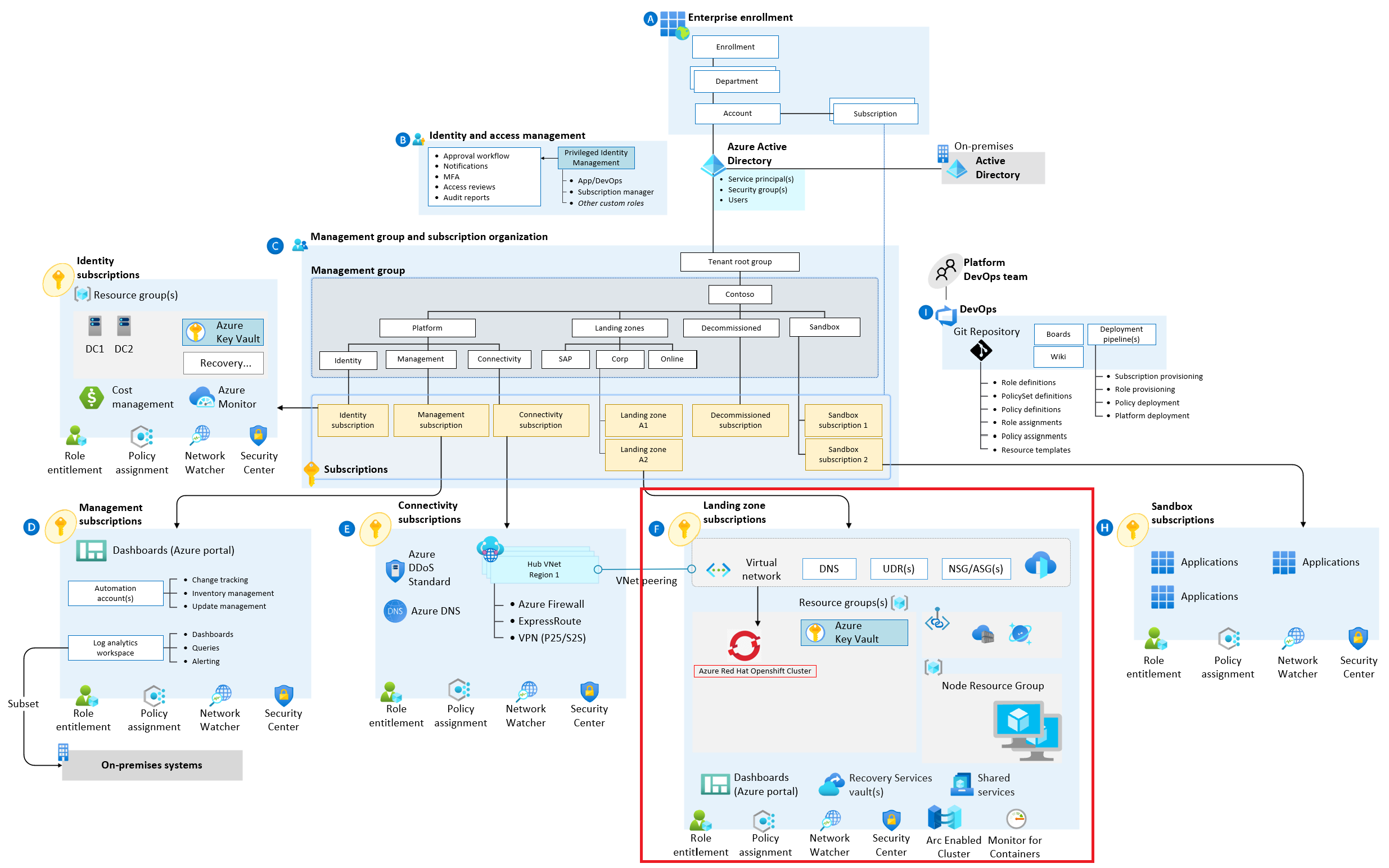
ARO as an application landing zone within the Azure platform foundation. Source: Microsoft Cloud Adoption Framework.
This matters because it defines the sequence. You cannot design an ARO landing zone in isolation. The network topology, DNS resolution, identity model, and governance policies all flow down from the platform foundation. If your platform foundation isn't designed to accommodate ARO's specific requirements — and it has several — you will hit walls during deployment that require rearchitecting the foundation, not just the cluster.
The platform foundation is not optional. It is the prerequisite. Every design decision in this guide assumes you have one — or are building one alongside your ARO deployment.
The Detailed Architecture: What You're Actually Building
The conceptual architecture tells you where ARO fits. The detailed architecture tells you what you're actually deploying. This is the reference design we use for regulated enterprise ARO deployments — every component has a reason, and every connection has a security control behind it.
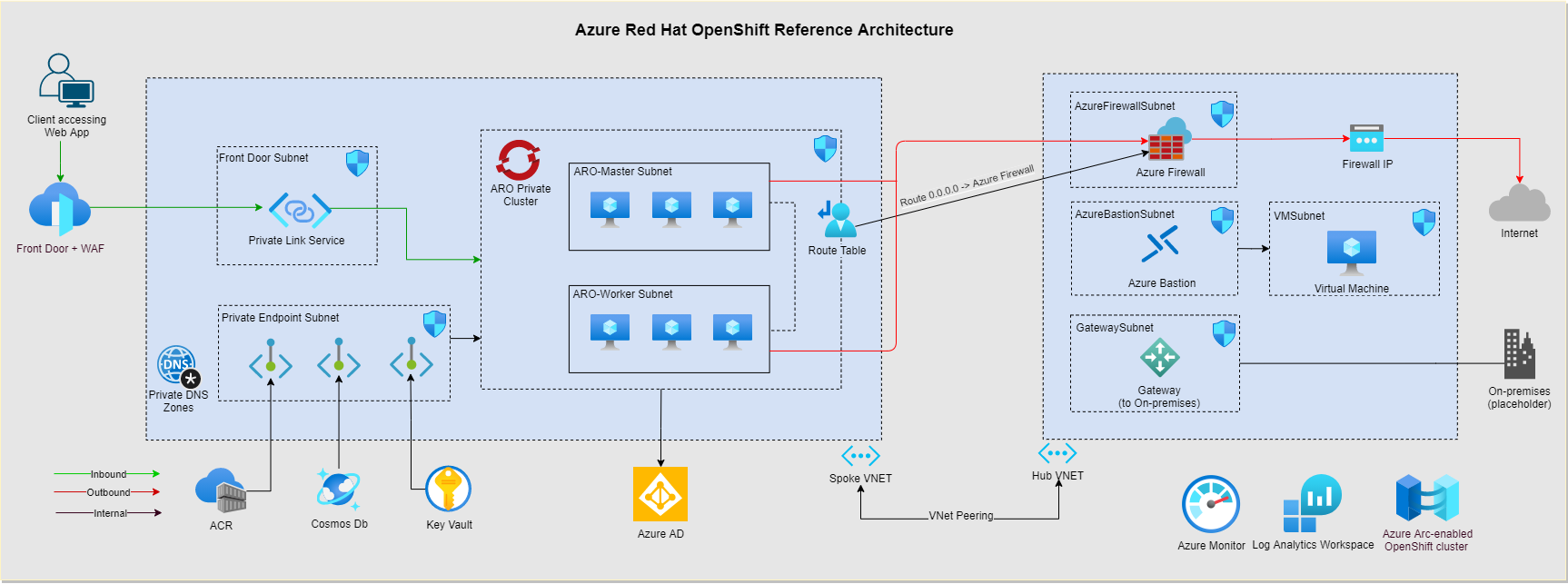
ARO landing zone detailed architecture — hub-spoke topology, private cluster, egress control, and enterprise connectivity. Source: Microsoft Cloud Adoption Framework.
What you're looking at: a private ARO cluster deployed into a dedicated spoke VNet, connected to a hub via VNet peering. All egress routes through Azure Firewall in the hub. Private endpoints for every Azure PaaS dependency. No public IP on the API server. No direct internet access from worker nodes. This is the baseline for regulated industries — not an advanced configuration, the starting point.
Let's walk through each design area and the decisions that matter.
Design Area 1: Network Topology
Network design is where most ARO deployments go wrong. ARO has specific networking requirements that interact badly with poorly designed hub-spoke topologies — and the failures are subtle enough that they don't surface until you're under load or trying to connect to enterprise systems.
Hub-spoke with a dedicated ARO spoke
ARO requires two dedicated subnets within its VNet: a master subnet for control plane nodes and a worker subnet for compute nodes. These subnets cannot be shared with other workloads — ARO owns them. This means ARO needs its own spoke VNet, not a shared application spoke. Size the subnets for growth: /23 minimum for workers if you expect to scale beyond 20 nodes, /24 for masters.
The spoke peers to your hub. All traffic to on-premises, to other spokes, and to the internet routes through the hub. This is standard hub-spoke — the ARO-specific consideration is that you must disable private endpoint network policies on the master and worker subnets, and you must ensure your hub DNS forwarder can resolve private endpoint DNS zones that ARO depends on.
Private cluster — non-negotiable for regulated industries
Deploy ARO with a private API server endpoint. This means the Kubernetes API server is only reachable from within your VNet or connected networks — not from the public internet. For regulated industries, this is not optional. A publicly accessible API server is a compliance finding on day one.
Private cluster deployment has operational implications: your CI/CD pipelines, kubectl access, and any tooling that talks to the API server must run within the network boundary or connect via VPN/ExpressRoute. Plan for this before deployment, not after. We typically deploy a jump host or Azure Bastion in the hub for operator access, and ensure Azure DevOps or GitHub Actions self-hosted runners are VNet-integrated for pipeline access.
Egress control via Azure Firewall
ARO worker nodes need outbound internet access for image pulls, operator updates, and Red Hat telemetry. In a regulated environment, you cannot allow unrestricted egress. Route all outbound traffic through Azure Firewall in the hub and create explicit allow rules for the ARO-required FQDNs — Microsoft publishes the required egress list, and it is longer than most architects expect.
The UDR (User Defined Route) on the worker subnet forces all 0.0.0.0/0 traffic to the Azure Firewall private IP. This gives your security team full visibility into every outbound connection from every worker node — which is exactly what your SOC 2 or FedRAMP auditor will ask for.
Private endpoints for every PaaS dependency
ARO integrates with Azure Container Registry for image storage, Azure Key Vault for secrets, and Azure Storage for persistent volumes. Every one of these should be accessed via private endpoint — no public network access. Private endpoints land in the hub or a shared services spoke, with DNS A records registered in your private DNS zones and forwarded from the hub DNS resolver.
The DNS forwarding chain is where most teams get stuck: ARO worker nodes use the VNet DNS server (hub forwarder), which forwards to Azure Private DNS zones for resolution. If this chain breaks — wrong DNS server on the VNet, missing private DNS zone link, or incorrect forwarder configuration — your pods cannot resolve private endpoint FQDNs and your deployments fail silently. Test DNS resolution from a pod before you declare the network ready.
Design Area 2: Identity and Access Management
ARO has a layered identity model that confuses architects who are used to AKS. There are three distinct identity layers, and they need to be designed together — not independently.
Azure RBAC for infrastructure
ARO requires a service principal or managed identity with Contributor rights on the VNet and a custom role on the route table. This is the identity ARO uses to manage Azure resources — creating load balancers, attaching disks, managing network security group rules. Scope this identity to the minimum required resources, not the entire subscription. In regulated environments, over-privileged service principals are a compliance finding.
Use a managed identity where possible — it eliminates credential rotation and removes the risk of a leaked service principal secret. ARO supports managed identity for the cluster identity as of recent versions. If you're on an older version, plan the migration.
Entra ID integration for cluster authentication
Configure ARO to use Entra ID (formerly Azure AD) as the identity provider for OpenShift authentication. This means your developers and operators log into the OpenShift console and oc CLI using their corporate credentials — no separate OpenShift user accounts, no password management, no MFA bypass. Single identity, single audit trail.
Map Entra ID groups to OpenShift groups for RBAC. Create dedicated groups for cluster admins, namespace admins, and read-only operators — and manage membership in Entra ID, not in OpenShift. This keeps your identity governance in one place and ensures that when someone leaves the organization, their OpenShift access is revoked automatically when their Entra ID account is disabled.
Workload identity for applications
Applications running on ARO that need to access Azure services — Key Vault, Storage, Service Bus — should use Azure Workload Identity, not service principal credentials injected as secrets. Workload Identity federates Kubernetes service accounts with Entra ID managed identities, giving pods a cryptographically verifiable identity without any credentials to manage or rotate.
This is the pattern that eliminates the “secrets in environment variables” anti-pattern that shows up in every regulated environment audit. No credentials in pods. No credentials in ConfigMaps. No credentials in Git. Just a managed identity with the minimum required permissions on the specific Azure resources the application needs.
Design Area 3: Security Controls
ARO ships with more built-in security than AKS — Security Context Constraints, built-in image scanning, automatic certificate rotation, and FIPS 140-2 validated cryptography. But “more built-in” doesn't mean “configured correctly for your environment.” These are the security controls that require intentional design.
Security Context Constraints
OpenShift's Security Context Constraints (SCCs) are more powerful than Kubernetes Pod Security Admission — and more complex. The default SCCs prevent containers from running as root, which breaks many off-the-shelf container images that were built for vanilla Kubernetes. Plan for this before you start migrating workloads.
The right approach: audit every workload for SCC compatibility before migration. Most issues are fixable — update the Dockerfile to run as a non-root user, or create a custom SCC with the minimum required privileges. Do not grant the privileged SCC broadly to work around compatibility issues. That defeats the entire security model and will be flagged in any security review.
Microsoft Defender for Containers
Enable Microsoft Defender for Containers on the ARO cluster. This provides runtime threat detection, vulnerability assessment for container images, and Kubernetes audit log analysis. In regulated industries, runtime threat detection is not optional — it's a control requirement under SOC 2 CC6.8, HIPAA, and most FedRAMP baselines.
Defender for Containers integrates with Microsoft Sentinel for alert correlation. Configure the Sentinel connector and create analytics rules for high-severity container alerts — privilege escalation attempts, suspicious process execution, and lateral movement indicators. These alerts should go to your SOC, not sit in a dashboard no one watches.
Azure Policy for ARO
Azure Policy has a built-in initiative for ARO that enforces Kubernetes-level controls through the Azure Policy add-on — no privileged containers, required resource limits, allowed image registries, and required labels. Apply this initiative at the subscription level so every ARO cluster in the landing zone inherits the controls automatically.
One important nuance: some Azure Policy controls for Kubernetes conflict with ARO's internal operators. The ARO service runs privileged system components that will trigger policy violations if you apply controls without exemptions. Microsoft documents the required exemptions — apply them to the openshift-* namespaces before you enable enforcement mode, or you will break the cluster.
Design Area 4: Operations and Observability
ARO includes a built-in monitoring stack — Prometheus and Grafana for cluster metrics, OpenShift Logging for log aggregation. For regulated enterprises, this is a starting point, not a complete solution. You need enterprise observability that integrates with your existing tooling and satisfies your audit requirements.
Centralized log forwarding
Configure OpenShift Logging to forward cluster logs — API server audit logs, application logs, infrastructure logs — to your central SIEM. For Azure-native environments, this means Azure Monitor Log Analytics or Microsoft Sentinel. For environments with an existing SIEM (Splunk, Sumo Logic), use the Cluster Log Forwarder to send logs directly.
API server audit logs are the most important. Every kubectl command, every API call, every authentication event is recorded in the audit log. In regulated industries, these logs are evidence for your SOC 2 audit, your FedRAMP continuous monitoring, and your incident response investigations. They need to be in your SIEM, retained for the required period, and protected from tampering.
Cluster upgrade management
ARO manages control plane upgrades automatically, but worker node upgrades require your action. In regulated environments, upgrades need to go through change management — tested in non-production, approved by change advisory board, executed during maintenance windows. Configure upgrade channels appropriately (stable for production, fast for non-production) and build the upgrade process into your operational runbooks before you need it.
One thing that catches teams off guard: ARO has a support lifecycle tied to OpenShift versions. Running an unsupported version is a compliance risk — you're running software with known unpatched vulnerabilities. Build version currency into your operational model from day one, not as an afterthought when you're already two versions behind.
Design Area 5: The Decisions That Determine Success
After deploying ARO across multiple regulated enterprise environments, these are the decisions we've seen determine whether a deployment succeeds or requires significant rework.
Design the network before you deploy the cluster. ARO cluster deployment is fast — under 40 minutes. Network design is slow — it requires coordination with your network team, your security team, and your on-premises connectivity owners. Do not start the cluster deployment until the network design is finalized and the hub-spoke topology is in place. Changing the network after the cluster is deployed is painful and sometimes requires cluster recreation.
Size subnets for 3x your expected node count. ARO subnets cannot be resized after deployment without cluster recreation. The master subnet needs to accommodate 3 control plane nodes plus some headroom. The worker subnet needs to accommodate your maximum expected node count — not your current count. We recommend sizing for 3x your initial deployment. The cost of unused IP space is zero. The cost of recreating a cluster because you ran out of IPs is significant.
Test SCC compatibility before migration day. Every workload you plan to run on ARO should be tested against OpenShift's Security Context Constraints in a non-production environment before you commit to a migration timeline. SCC incompatibilities are fixable, but they take time — and discovering them on migration day is how projects slip by months.
Build the operational model before go-live. Who approves cluster upgrades? Who responds to Defender for Containers alerts? Who manages the Entra ID group memberships that control cluster access? Who owns the change management process for ARO? These are not technical questions — they are operational questions that need answers before the cluster goes live. We have seen technically excellent ARO deployments fail in production because no one designed the operational model.
Use the ARO service principal or managed identity with minimum required permissions. The ARO cluster identity needs specific permissions on specific resources. Grant exactly those permissions — nothing more. In regulated environments, over-privileged identities are a compliance finding that will require remediation under time pressure. Get it right at deployment.
What Good Looks Like
A well-designed ARO landing zone for a regulated enterprise looks like this: a private cluster in a dedicated spoke VNet, peered to a hub with centralized egress through Azure Firewall. Entra ID as the identity provider for all human access. Workload Identity for all application access to Azure services. Azure Policy enforcing Kubernetes controls with appropriate exemptions for ARO system namespaces. Defender for Containers enabled with Sentinel integration. API server audit logs forwarded to the central SIEM. Upgrade management integrated into the change management process.
It is not a complex architecture. But every component has a reason, and every design decision was made intentionally. The enterprises that get ARO right treat it as an infrastructure design problem first — and a container platform problem second. The ones that struggle do it the other way around.
If you are evaluating ARO for a regulated workload, or you have an existing ARO deployment that needs a foundation review, the time to address it is before your next audit — not after.
Deploying ARO in a regulated environment?
Talk to an architect who has designed and deployed ARO landing zones for financial services, healthcare, and government organizations.
Schedule a Discovery Call